
|
|
|
(These entries are part of hiptop Nation, a communal weblog for anyone in the world using a Hiptop device) |
more mlee: |
| posted by mlee at tmail ° com more from this user ° all posts « OLDEST « PREVIOUS | NEXT » NEWEST » |
| Secrets of the Mobile Mosaic Mon 08.11.03 8:58pm PDT #5806 |
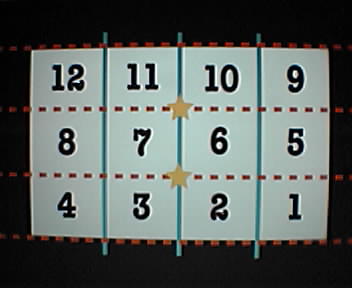 Here are some illustrated tips (click on the photo to see it full size) on how I made the mobile mosaics seen and mentioned previously. Here are some illustrated tips (click on the photo to see it full size) on how I made the mobile mosaics seen and mentioned previously. In the diagram, the white box represents any wide scene you want to shoot as a mosaic. Each numbered square represents a Sidekick camera frame. I try to scan down a scene using the live viewfinder across the locations of frames 10, 6 and 2 to get an idea of where each of the three rows of the mosaic will fall (horizontal red dotted lines). As I scan down, I try to remember two reference points in the center of the scene (shown as yellow stars). These points can be window corners, or some architectural or landscape detail. Now the big SECRET: Starting below the bottom reference point, pan the camera to position #1 and shoot RIGHT to LEFT from #1 to #4. Repeat for #5 through #8 and #9 through #12. Why scan and count backwards? Well, when you go back to the camera gallery page, you can check off the images starting with the last one from position #12 in the perfect sequence needed to e-mail to Hiptop Nation! Once the 12 are checked (you could have stopped at 4 or 8 for shorter mosaics), hit the MENU button to set up your e-mail in the usual way. Obviously, these mosaics take up a lot of bandwidth and are somewhat of a pain to shoot. The images don't have to match up perfectly. You can wing it in the way David Hockney did his Polaroid SX-70 mosaics in the early 70s. When you're being artsy, anything goes! Enjoy... - mike lee - baltimore |
| posted by mlee at tmail ° com more from this user ° all posts « OLDEST « PREVIOUS | NEXT » NEWEST » | Showing 10 entries per page. |
In case you were wondering, Hiptop Nation is not sponsored or endorsed by, or affiliated or associated with, Danger, Inc. in any way. Danger and Hiptop are trademarks of Danger, Inc. and Sidekick is a trademark of T-Mobile, USA |